NEW: How do I upload all honor band student audtions with BATCH UPLOAD
1. Click on "WIBC Honor Band Reg." at the left of the http://www.bandworld.org home screen.
2. Click on "Upload Batch"
CLICK HERE to download pdf help on Batch Upload (printable help sheet)
3. Type in your school info and select the recording type for your batch.
4. Have your students fill out a Student Info Form
5. Enter in the info for student #1
6. If the student is uploading an Mp3 recording, click on "Choose File" to browse your computer for the student's audition.
7. Continue on to student #2
8. If you have more than two students auditioning, click on "Add More Students" at the lower left of the screen.
9. Once you have entered all of your students, click on "Upload Batch" to send all info to WIBC.
10. You will see a payment screen with the following options:
- PO#/Check#
- Visa
- Mastercard
- Discover
- American Express
11. Once you have paid, you will see a confirmation screen with all of your students' information.
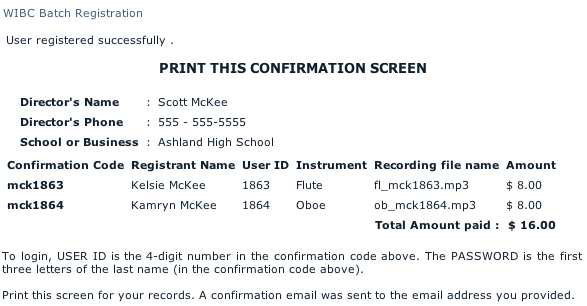
12. Note that you can login into each student account by using the confirmation codes.
(Example: 1863 = USER ID, mck = PASSWORD for Kelsie McKee's account)
13. Last step:
- If you are sending Mp3 auditions, and you paid with credit card, then you are done. (If sending checks or purchase order, mail to WIBC)
- If you are sending cassette auditions, then you need to send a printed copy of the confirmation screen with all the auditions to WIBC. (If sending checks or purchase order, mail to WIBC)
- If you are sending CD auditions, please put them all on one CD and send a printed copy of the confirmation screen with the CD to WIBC. (If sending checks or purchase order, mail to WIBC)
WIBC
407 Terrace St.
Ashland, OR 97520
If you have questions, e-mail Scott McKee at [email protected] or call 1-800-247-2263 ext. 3